Framework Introduction
SpyneJS is a behavior-first frontend framework for building real-DOM applications. It has run in production at large enterprise firms since 2019.
What behavior-first means
A browser application is behavior and data, continuously synced to a display. SpyneJS is organized around that fact: every event and every piece of data is captured as behavior — one stream, lasting the life of the application, available to all of it. Views subscribe to the stream and keep their DOM regions in sync; logic lives in pure functions composed wherever they're needed. That is the entire model — VBL: View, Behavior, Logic — what renders, what moves, what decides.
Why it matters
The persistent difficulty of frontend work is the seamless experience: keeping many parts of the DOM in sync as behavior and data arrive from everywhere. Behavior-first makes that synchronization the organizing concern of the codebase rather than a problem solved piecemeal. Because everything travels one stream, any part of the application can communicate with any other, at any scale — and external content enters the stream as ordinary behavior, not through special cases that sit outside the application's communication. For applications that need to stay stable across years and teams, this is the property that compounds.
Why it matters for AI
Each layer has its own classes and its own rules, so what code does can be read — and verified — against the structure it declares. That is precisely what generated code needs: something exact to be written against, and something exact to be checked against. The structure is defined at the source, so an AI tool working in a SpyneJS codebase isn't inferring intent from convention — it's reading declarations. The framework didn't add this for AI; it's what behavior-first structure has always provided, and AI tools are the newest reader to benefit from it.
pattern VBL: View, Behavior, Logic
A browser application looks like a content-display system. It is actually a behavior-and-data integration system that displays content as a consequence. Most frontend architecture starts from the display and scatters behavior across it; VBL starts from behavior and gives it a home of its own.
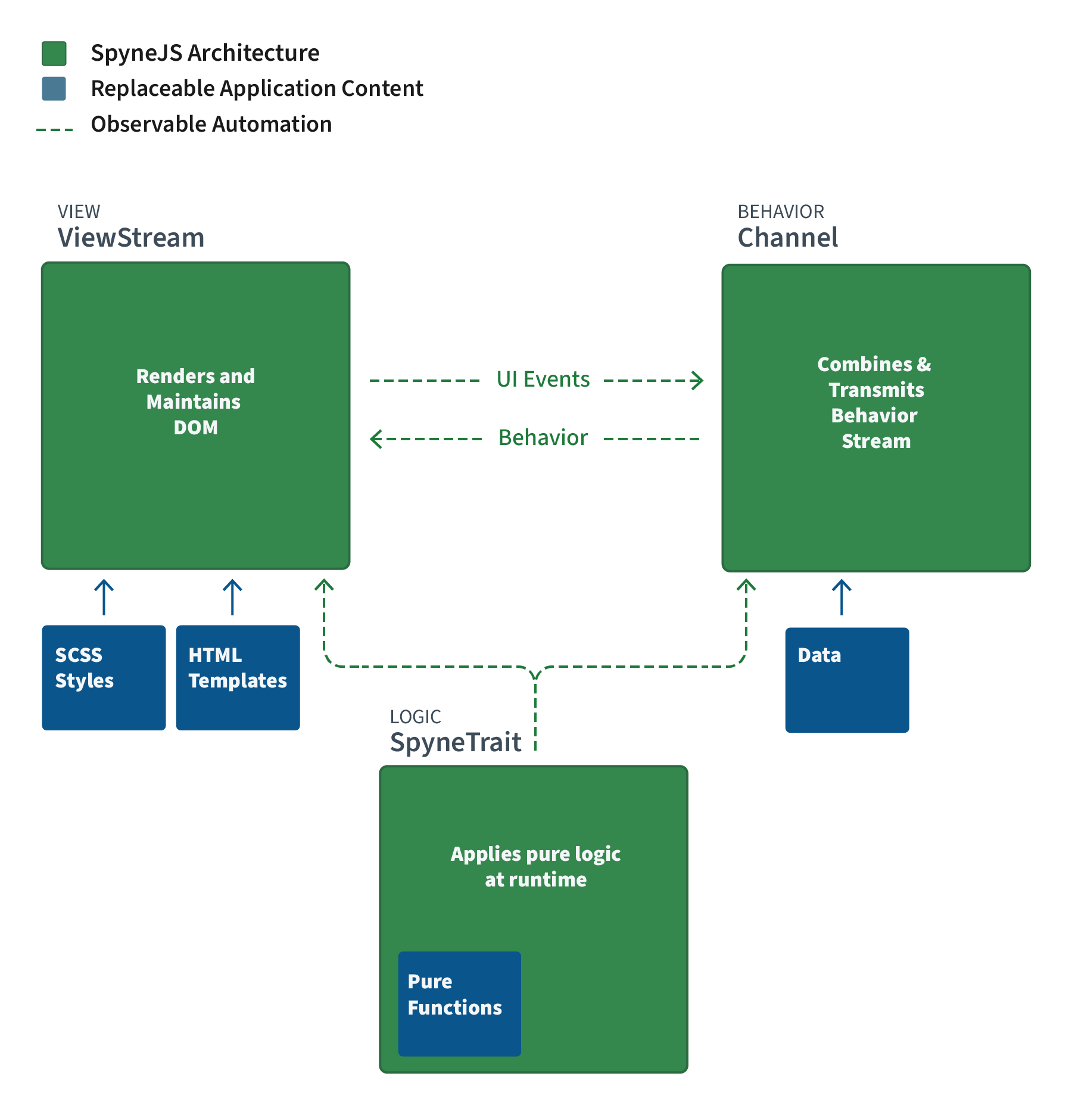
The pattern has three layers — what renders, what moves, what decides:
View — the visible interface. Its primitive is the ViewStream, a class that owns one DOM region rooted in a single element. Views render, nest other Views, and declare which Behavior they listen to. They contain no logic and no event plumbing.
Behavior — timing and flow: when things happen and how information moves. Its primitive is the Channel, a persistent observable stream. Every event and every piece of data in a SpyneJS application travels through a Channel as a uniform payload.
Logic — reusable computation: formatting, shaping, validating, deciding. Its primitive is the SpyneTrait, a module of pure functions composed into ViewStreams and Channels at construction.
VBL Architecture in SpyneJS
Structure vs Replaceable content
Where the pattern comes from
VBL descends from a familiar line. MVC separated display from data but left interaction ambiguous — behavior ended up wherever it was convenient. DCI (Data, Context, Interaction) made interaction a first-class concern, but predates the tooling to enforce it in a browser. VBL is that separation made native to the web platform: the DOM is the view tree, events are the behavior stream, JavaScript is logic — and observable streams supply what earlier patterns lacked, a way to automate the coordination between layers without hiding it. SpyneJS calls this observable automation: rendering, lifecycle, and event synchronization run in the background, and every payload they move remains open to inspection and replay.
Separation is enforced, not encouraged
Each layer has its own classes, and each class is constrained to its layer's capabilities. A ViewStream has no place to accumulate logic; logic lives in traits because that is the only place it can. This is the difference between a convention a team maintains and a boundary the framework maintains: the separation holds regardless of deadline pressure, team turnover, or codebase age.
The Three VBL Classes
ViewStream, Channel, and SpyneTrait side by side
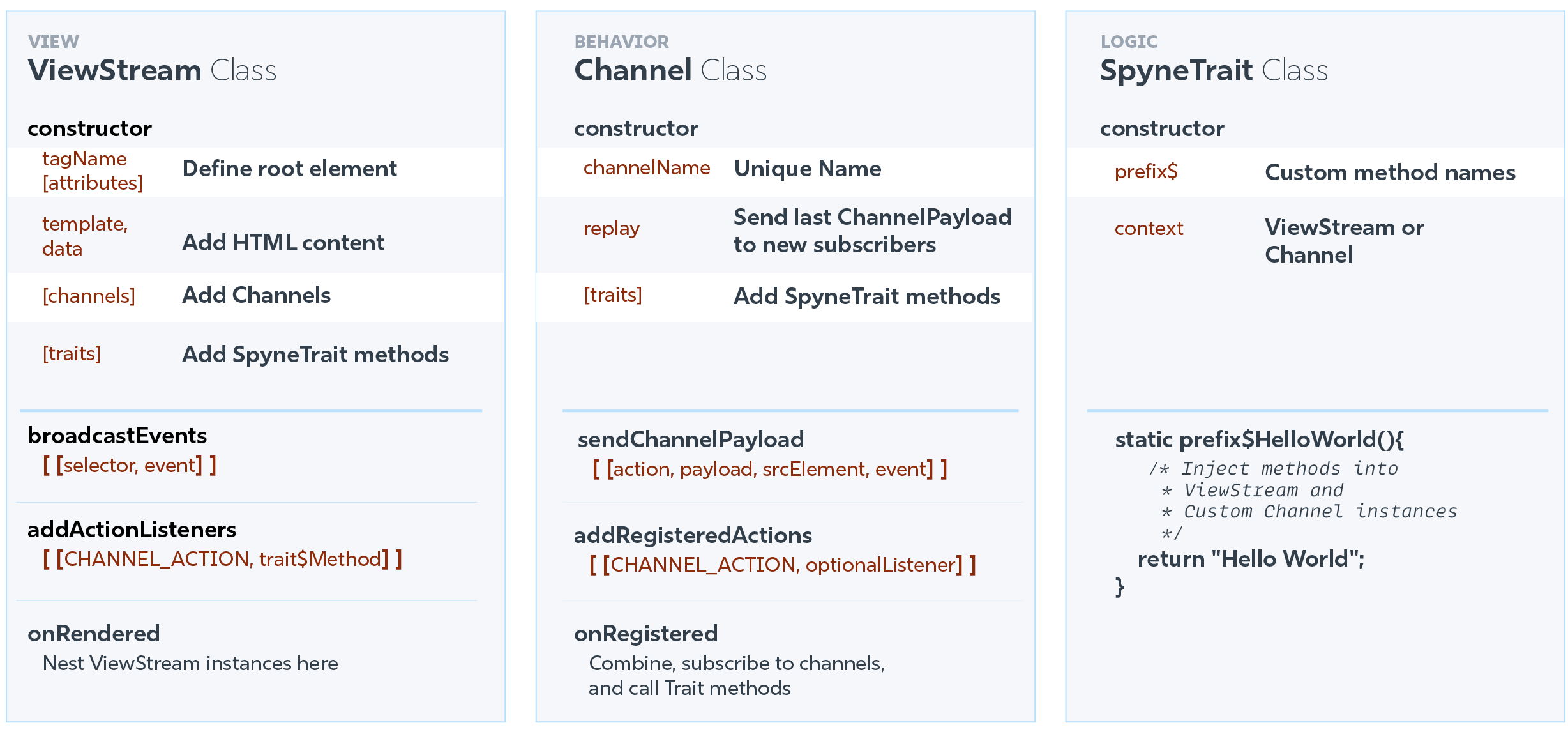
The three layers in depth:
- ViewStream — rendering, nesting, wiring Behavior to Logic.
- Channels — the built-in channels, fetch, custom channels, and state at the channel layer.
- SpyneTrait — where all functions live, and why they're findable.
View ViewStream
A ViewStream maintains one DOM region rooted in a single element. Views are cleared of behavior and logic; a ViewStream declares its structure, sends its events, and wires channel payloads to methods that keep its region in sync.
How a ViewStream works
Construction. The constructor's props declare the root element (tag name, attributes), an HTML template, and the data bound into it. Any Channel the view will listen to is added to the props.channels array here.
Rendering. The root element renders with the template as its content. Template placeholders fill automatically from the declared data. Templates hold no logic — placeholders are the only dynamic part.
Events out. broadcastEvents returns selector–event pairs. Each declared pair captures that element's events and emits them to the UI Channel as payloads. No manual event listeners are attached, and none need removal.
Payloads in. addActionListeners returns entries pairing a channel action label with the method that receives its payload; an optional third element filters which payloads qualify. Labels match exactly or by pattern ('CHANGE_.*'). When a listed channel emits a matching action, the paired method runs and updates the region.
class MainView extends ViewStream {
constructor(props = {}) {
// VIEW: ADD CONTENT
props.template = `<h2></h2>
<button>Click Me</button>`
// BEHAVIOR: ADD CHANNELS
props.channels = ["CHANNEL_UI"]
// LOGIC: ADD METHODS
props.traits = [HelloWorldTrait]
super(props);
}
// BEHAVIOR: CONNECT EVENTS TO METHODS
addActionListeners() {
return [["CHANNEL_UI_CLICK_EVENT", "hw$greet"]]
}
// BEHAVIOR: SEND LOCAL EVENTS
broadcastEvents() {
return [["button", "click"]]
}
// RENDER HOOK
onRendered() {
this.hw$greet()
}
}
new MainView().appendToDom(document.body)
Nesting
ViewStreams nest to form the interface. Encapsulation holds in both directions: a child holds no reference to its parent, and a parent holds no reference to its children as instances. Nesting creates an internal observable chain between them, and that chain automates rendering and disposal.
A ViewStream can also attach directly to any existing element: myCustomVS.appendToDom('main').
- appendView and prependView — see the methods in Reference for more info.
Lifecycle
onRendered fires when the view's element is in the DOM — the place to nest child views. Disposal cascades depth-first: a view's descendants dispose first, then the view itself. With no external references held, disposed views are immediately eligible for garbage collection.
Behavior Channels
The goal of Channels is to capture all events and data as behavior.
Events and data have the same shape — each emits information at a moment in the application's life. Frontend applications have always kept them apart: event handling in one place, data handling in another, and the difficulty of keeping the UI in sync with both accumulating in between. Channels resolve this by bringing events and data into a single stream that lasts for the entire application. Every View syncs itself the same way, from the same place, to any event or any data point.
The Channels Stream
Behavior sources conform into ChannelPayloads
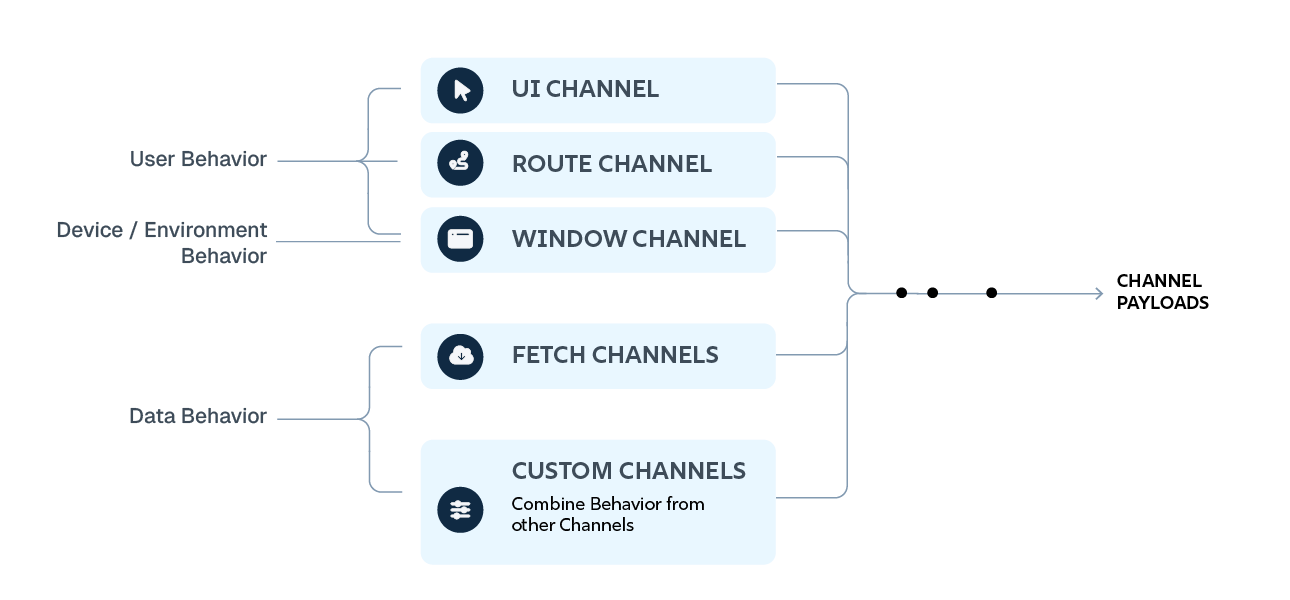
Whatever the source — a click, a route change, a fetched response — it travels the stream as a ChannelPayload: an action label naming what happened, the data, the source element, and the originating event.
How a Channel works
A Channel does three things, in sequence:
Behavior comes in. From the browser (the built-in event channels), from a fetch, from a View sending information, or from another Channel it subscribes to. A Channel wires incoming behavior to its methods — supplied by SpyneTraits — in three ways:
- At registration —
onRegistered, the place to set up custom events and initial actions. - Through subscriptions to other Channels — the SpyneTrait method provided to the subscription is called with each payload.
- By listening for what Views send —
onViewStreamInforeceives what ViewStream instances send viasendInfoToChannel.
The Channel shapes it. Its methods turn what arrived into what subscribers need: the data itself, flags describing it, and an action label naming what happened. This is ordinary code — parsing a response, deriving a value, setting a boolean.
It goes back out. The Channel re-emits the shaped payload to everyone subscribed. Subscribers don't take everything: they narrow to specific channels, then specific actions, then optionally filter on the payload itself. A payload reaches a method only if it passes each step the subscriber declared.
That's the whole cycle: in, shaped, out, narrowed. Everything else on this page is a variation of it.
Thinking in Channels
Once the cycle is familiar, application design becomes a matter of sync moments: find the moment the UI needs to change, and formulate the data Views need at that moment — or the data another Channel needs, to parse and customize further before Views receive it.
There is no separate event reference and data reference to maintain. Behavior lives in one place in the codebase.
The built-in channels
SpyneJS starts three event channels with every application — Window (global events, media queries), Route (URL as application state), and UI (declared DOM events).
Their configuration is covered in SpyneApp Initialization:
- Window Channel — global events and media queries.
- Route Channel — the URL as application state.
- UI Channel — declared DOM events.
Fetch channels
ChannelFetch streams external data into the cycle, with full CRUD connection — create, read, update, delete. A map method shapes data the moment it arrives. Incoming data is sanitized before entering the stream — remote data is treated as untrusted regardless of the application's configured mode. Individual fetch channels handling trusted feeds can opt out with disableSanitize. Views receive fetched data the same way they receive a click.
Custom channels
A custom Channel combines behavior from other Channels — UI events, route changes, fetched data, any mix — and shapes it into what Views actually need: presentation-ready data, plus state flags telling each View when to respond. Views subscribe to one custom Channel instead of coordinating several sources themselves.
State at the channel layer
Channels outlive Views — a ViewStream renders and disposes; its Channels keep running. That makes the channel layer where application state lives between renders.
A View holds only what it displays. State that must survive a View — a form across navigation, a selection across page changes, a multi-step flow — belongs in a Channel: it holds current state, updates it as actions arrive, and re-emits. A Channel with replay turned on repeats its latest action to each new subscriber, so a View rendering late receives current state immediately.
This is the state-machine pattern: the Channel tracks which state the application is in and which actions move it forward. Views render from the Channel's state, send user actions back to it, and dispose without anything being lost.
      import { Channel } from 'spyne';

      // State lives here, not in Views:
      // Views render from it, send actions to it, and dispose freely.
      class ChannelSteps extends Channel {
        constructor(props = {}) {

          // REPLAY: late-rendering Views receive current state immediately
          props.replay = true;
          super('CHANNEL_STEPS', props);
        }

        // STATE: set when the channel registers
        onRegistered() {
          this.sendChannelPayload('CHANNEL_STEPS_UPDATE_EVENT', { step: 1 });
        }

        // IN: a View sends an action
        // OUT: the channel advances state and re-emits
        onViewStreamInfo(payload) {
          const step = payload.data.step + 1;
          this.sendChannelPayload('CHANNEL_STEPS_UPDATE_EVENT', { step });
        }
      }
External APIs and third-party events
Some libraries emit events the browser's UI events don't capture. Channels can't read the DOM, so a dedicated ViewStream — typically one that never renders (see appendToNull) — captures those events and sends them into a custom Channel. From there the external source is available to the whole application, like any other behavior.
Logic SpyneTrait
The goal of SpyneTraits is to give every function in the application one place to live.
Views render and wire; Channels carry and shape behavior; neither is a home for general logic — and templates hold none at all. That leaves exactly one layer for functions: the SpyneTrait, a class grouping related methods that compose into ViewStreams and Channels.
Because logic can live nowhere else, finding it stops being a search. The question "where is the function that formats this date, validates this form, parses this response?" always has the same answer: in a trait, organized by what the function does — not by which component happens to use it.
How a SpyneTrait works
Methods are grouped by purpose. A trait collects related functions under a shared prefix — form$validateInput, form$submitData, form$resetForm. The prefix makes every trait method recognizable at its call site: anywhere in the codebase, a $-prefixed method is trait logic, and the prefix names which trait.
Traits compose into hosts. A ViewStream or Channel lists the traits it uses in its props. At construction, each trait's methods are added to the host and bound to its context — this inside a trait method is the ViewStream or Channel using it. No manual binding, no imports scattered through the class body: the props declaration is the complete list of where a host's logic comes from.
Methods stay pure. Trait methods take input and return output. They hold no state of their own — state lives in Channels — which keeps each method testable in isolation and reusable across hosts: the same FormTrait serves any View with a form, the same DataTrait serves any Channel parsing responses.
Organizing traits
Traits divide the application's logic by domain: form handling, animation, authentication, data parsing, analytics — whatever domains the application has. The division is yours to choose; the framework's contribution is that whichever division you choose becomes the codebase's actual structure, because there is nowhere else for the functions to drift to.
A trait used by one View can stay small and local. A trait used everywhere — formatting, validation — is written once and composed wherever needed. Both follow the same pattern; scale changes nothing about how a trait is written or found.
Traits in each layer
In a ViewStream, trait methods are what addActionListeners pairs with channel actions — the payload arrives, the trait method updates the region.
In a Channel, trait methods are what shape incoming behavior — parsing, deriving, flag-setting — before the Channel re-emits.
The same trait class can serve either host. Its methods run in whichever context composed them.
This completes the pattern: Views declare structure and wiring, Channels carry and shape behavior, traits hold the functions both call on.
Getting Started SpyneApp Initialization
Every SpyneJS application starts the same way: src/index.js calls SpyneApp.init with a configuration object, then renders the root ViewStream. Whether that file is written by hand or scaffolded with spyne-cli create-app, the resulting structure is the same:
   import { SpyneApp, ViewStream } from 'spyne';

   SpyneApp.init({ debug: true });

   const appView = new ViewStream({
     data: "Hello SpyneJS"
   })

   appView().appendToDom(document.body);

   // outputs <div><h3>Hello SpyneJS</h3></div>
Initialization does the application's structural work in one place. It starts the three built-in event channels, registers the application's custom channels and fetch channels, and registers any plugins. When it completes, the full behavior layer is running — before a single View renders. Views then attach to a stream that is already live.
What the configuration declares
The built-in channels. Three event channels start with every application, each configurable here:
- Window Channel — global events and media queries — resize, scroll, breakpoints, custom global listeners.
- Route Channel — the URL as application state — route structure, variables, and navigation type declared as configuration.
-
UI Channel — declared DOM events — the channel
broadcastEventsfeeds; runs without configuration for standard events.
Custom and fetch channels. Each Channel class the application defines is registered by name in the channels map. Registration is what makes a Channel subscribable — a View or Channel can list any registered name and receive its payloads.
Plugins.
- Register Plugins — plugins register the same way channels do, extending the application at initialization.
Application properties. Application-level properties set debugging and the sanitization posture for the whole application — decided once, at init. Debug mode significantly expands logging: detailed warnings for missing or mismatched action labels, undefined method names, and configuration issues in the wiring between ViewStreams, Channels, and traits. Sanitization is on by default with no configuration required; the properties adjust posture. Full options are covered in the application shell configuration.
After init
SpyneApp.init returns with the behavior layer live. The last line of src/index.js renders the root View — typically with appendToDom — and the application is running: events flowing, routes resolving, Views syncing. The root ViewStream is the entry point for rendering and can host any number of nested ViewStream instances; from here, the application grows by composition.
Getting Started Window Channel
The Window Channel captures global browser events and emits them as ChannelPayloads.
Everything the browser reports at the window level — resize, scroll, focus, online/offline, key events, orientation — is available to the application the same way any other behavior is: subscribe to the channel, pair actions with methods. No View attaches its own window listeners.
Configuration
The Window Channel is configured at SpyneApp.init: the config declares which global events the channel captures. Each declared event emits under a predictable action label — blur emits CHANNEL_WINDOW_BLUR_EVENT, resize emits CHANNEL_WINDOW_RESIZE_EVENT — the same pattern for every event.
- Application Shell — the full event-to-action table and all window configuration options.
High-frequency events — scroll, resize, orientation — take additional options, including a debounce setting that controls how often the channel emits. Frequency is decided once, in config, rather than per subscriber.
Media queries
The Window Channel captures responsive layout changes through matchMedia. Media queries declared in config emit CHANNEL_WINDOW_MEDIA_QUERY_EVENT with the mediaQueryName in the payload — a View syncs to a breakpoint change the way it syncs to a click: pair the action with a method, filter on the query name.
Syncing to window behavior
A View lists the Window Channel in its channels and pairs window actions with methods in addActionListeners; a custom Channel registers for window actions to combine them with other behavior — a resize and current route shaping into one layout payload is a routine pattern.
        SpyneApp.init({
          channels: {
            WINDOW: {

              // GLOBAL EVENTS the channel captures
              events: ['resize', 'blur', 'online', 'offline'],

              // MEDIA QUERIES: each change emits
              // CHANNEL_WINDOW_MEDIA_QUERY_EVENT with its mediaQueryName
              mediaQueries: {
                desktop: '(min-width: 1024px)',
                mobile: '(max-width: 1023px)'
              }
            }
          }
        });
Getting Started Route Channel
The goal of the Route Channel is to treat the URL as what it is: application state.
A route is not a special kind of navigation to be handled apart from everything else — it is a set of named variables whose current values describe where the application is. The Route Channel maintains those variables in both directions: it updates window.location when the application navigates, and it emits navigation changes as structured data for any View or Channel to sync to.
Route Config to routeData
One declaration, the full round trip
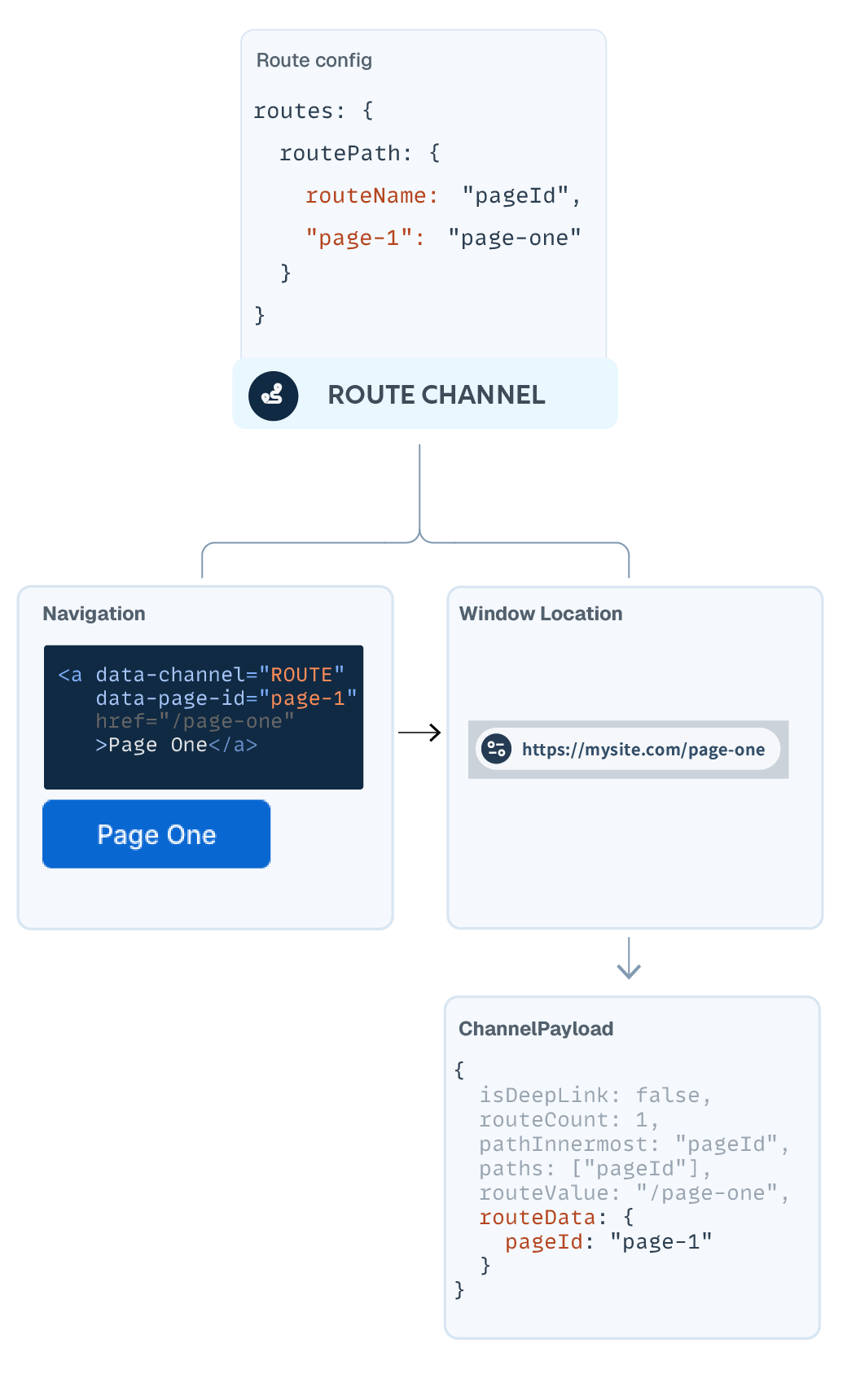
How the Route Channel works
The route config declares the application's route variables and their URL values. From that one declaration, the Route Channel handles the full round trip:
Links are generated, not authored. When the application loads, the Route Channel provides navigation values as routeData.navLinks — href values built from the config in the currently configured URL style.
A click is one event with two effects. Following a navigation link updates window.location and emits the routeData ChannelPayload at the same time. The URL and the application's route state cannot drift, because they are the same event.
Any origin, same payload. A link click, a typed URL, the back button — every way the location can change produces the same structured routeData. Subscribers sync to route state without knowing or caring how the navigation happened.
The route config
Routes are declared as nested routePath objects that mirror the application's navigation hierarchy. Each level names its variable with routeName and maps that variable's values to URL segments:
    SpyneApp.init({
      channels: {
        ROUTE: {
          routes: {

            // FIRST URL SEGMENT: pageId
            routePath: {
              routeName: 'pageId',
              home: ['', 'index.html'],

              // SECOND URL SEGMENT: cardId, nested under page-1
              'page-1': {
                routePath: {
                  routeName: 'cardId',
                  'card-1': 'card-1'
                }
              }
            }
          }
        }
      }
    });
Here the URL carries two variables: pageId at the first segment, cardId at the second. A location of /page-1/card-1 emits routeData with both values set; navigating to /home emits pageId alone.
A property's value maps it to the URL. A string maps one URL segment; an array maps several — any string in the array matches the property, and the first item is what URL generation uses. In the example above, home matches both an empty path and index.html, and generates the empty path.
Navigation links
A navigation link declares its route intent with dataset attributes:
data-channel="ROUTE"sends the click to the Route Channel.- The route variable rides the attribute name:
routeName: "pageId"becomesdata-page-id— dataset attributes convert to camelCase automatically. The attribute's value is the route key. - The
hrefis inert during in-app navigation — the dataset attributes drive the Route Channel. It is there for every other way a link can be used: opened in a new window or tab, it becomes that window's first deeplink, and the application starts at that route.
One config, any notation
The Route Channel writes the URL in whichever style the config selects:
Slash notation: /page-oneQuery notation: ?pageId=page-oneHash notation: /#page-one
Switching notation is a config change, not an application change: routes, links, and emitted routeData stay identical, because navLinks regenerates every href in the new style.
Unmatched routes
A location that matches no declared route emits a 404 action automatically. The application decides what a View does with it; detecting it requires nothing.
Syncing to route state
Route changes arrive as ChannelPayloads like any other behavior. A View lists the Route Channel in its channels and pairs route actions with methods in addActionListeners; a custom Channel registers for route actions and combines them with other behavior — a route change and a fetched response shaping into one payload for Views is a routine pattern. Because the Route Channel replays, a View rendering after navigation still receives the current route immediately.
    import { ViewStream } from 'spyne';
    import { RouteTrait } from './route-trait.js';

    class PageView extends ViewStream {
      constructor(props = {}) {
        props.traits = [RouteTrait];
        props.channels = ['CHANNEL_ROUTE'];
        super(props);
      }

      // Every route action reaches one method,
      // which reads pageId / cardId from the payload's routeData
      addActionListeners() {
        return [['CHANNEL_ROUTE_.*_EVENT', 'route$onEvent']];
      }
    }
Getting Started UI Channel
The UI Channel carries every DOM event that Views declare.
It has no configuration. The channel runs from what ViewStreams declare in broadcastEvents: each declared selector–event pair emits to the UI Channel as a ChannelPayload, listeners attach and remove with the elements themselves, and the channel is live from SpyneApp.init without an entry in the config.
- ViewStream — how declaration works.
- ViewStream Reference — the full event surface.
Custom and third-party events
Browser UI events are recognized automatically. An event outside that set — a custom event, or one dispatched by a third-party library — is declared with an added attribute on the element:
data-is-custom-event="true"
With the attribute present, the declared event broadcasts like any browser event. Without it, the event is not captured, and debug mode logs a warning identifying the undeclared event.
Getting Started Register Plugins
A SpynePlugin packages shareable application parts — ViewStream components, Channels, SpyneTraits, and themes — as one unit that registers into an application.
A plugin is a class like any other in the framework: it declares a unique pluginName, brings its own channels and views, and can expose pluginMethods — methods added to the application for global access.
How registration works
Plugins are registered at initialization, the same way channels are:
    import { SpyneApp } from 'spyne';
    import { MyPlugin } from './my-plugin.js';

    SpyneApp.init(config);

    // Same idiom as channels: an initialized instance, registered at init
    SpyneApp.registerPlugin(new MyPlugin());
Registration gives the plugin the correct SpyneApp instance. The plugin's channels register like any channels — unique names enforced across everything loaded — and from that point its payloads, subscriptions, and views behave exactly as if the application had declared them itself.
Two hooks mark the plugin's arrival:
onRegistered— fires when all of the plugin's channels have been registered.onRendered— fires when the plugin's HTML element has been added to the DOM.
What registration grants
A registered plugin has complete access to the application — its channels, its views, its properties. Vet plugins accordingly: registration is trust.
- SpyneApp.registerPlugin — the full SpynePlugin surface: constructor props, hooks, method exposure.
Where to go deeper
Platform
Overview
SpyneJS ships with first-party tools for generating, authoring, and inspecting applications. Each is built on the same VBL surfaces application code uses — plugins, channels, and views, with no separate runtime.
The Application Shell is a complete starting application, scaffolded from the CLI. The SpyneJS Generative Grammar gives AI coding tools a versioned, structured description of the framework. The CMS lets non-developers edit content while structure stays in code. The Design System provides reusable UI primitives. Plugins are the seam by which tools integrate. Developer Tools — the Behavior Console and Spyne-CLI — support inspection and scaffolding.
Available Now Application Shell
The Application Shell is a complete SpyneJS application to start from: configured channels, routed pages, nested ViewStream structure, and styling in place. It is scaffolded from the CLI — spyne-cli create-app — and application content can be generated into its structure from a natural-language prompt.
The shell demonstrates the framework's patterns at application scale: how channels are configured, how pages mount and dispose, and how content and structure divide.
- Application Shell — generate application content at /configure.
Available on npm Generative Grammar
The SpyneJS Generative Grammar — published as @spynejs/grammar — is a versioned, structured description of the framework for AI coding tools: API surfaces, idiomatic call patterns, worked examples, and the conventions that distinguish current practice from legacy forms.
The kit installs as a content-only package, and an AGENTS.md entry points coding agents to it. The Grammar is versioned with the framework, so what an agent reads matches what the installed version does.
Beta CMS
The CMS lets non-developers edit content in a SpyneJS application while structure stays in code. Content teams update copy, assets, and structured data; the application's VBL structure remains developer-controlled.
The CMS is built on the Plugins system. A local Node server handles authentication, data updates, and cached backups, integrating with content boundaries declared on ViewStream instances in code.
Browseable Now Design System
The SpyneJS Design System provides reusable UI primitives — typography, buttons, links, forms, lists, tables, and layout utilities — built to integrate with ViewStream templates without imposing a design opinion.
The system is browseable as a live reference, with code samples and accessibility notes for every element.
Available Now Plugins
A SpynePlugin packages shareable application parts — views, channels, traits, and themes — as one unit that registers into an application at initialization. There is no separate plugin runtime: a registered plugin's channels, views, and traits behave exactly as if the application had declared them itself. The CMS and the Behavior Console are both built this way.
- Register Plugins — plugin registration and hooks; each first-party plugin's README covers its own setup.
Available Now Developer Tools
First-party tools for inspecting, debugging, and scaffolding SpyneJS applications during development.
Available Now Behavior Console
The Behavior Console renders the live behavior stream as it flows — every event, every data flow, every payload, with source elements and originating events visible in real time. Built on the Plugins system.
Available on npm Spyne-CLI
Spyne-CLI scaffolds a complete SpyneJS application with create-app, and generates ViewStream, DomElement, Channel, and SpyneTrait files from prompts that specify type, filename, location, channel name, and other parameters. Available on npm.
missing Examples
SpyneJS Framework Examples
Basic examples to help become familiar with the SpyneJS Framework
Hello World – Minimal View
This example shows the absolute minimum required to render content in SpyneJS using a ViewStream.
No configuration, no template syntax — just data and output.
appendToDom is one of several flexible methods for rendering ViewStream instances into the DOM.
Why This Matters:
One line of code carries the same structure used in larger applications — nothing about the minimal example is discarded later.
import {ViewStream} from 'spyne'; new ViewStream({ data: "Hello World" }).appendToDom(document.body); Adoption
SpyneJS will feel familiar if you've built components, used a templating system, or managed application state. The mental model carries over. What changes is how logic and behavior are expressed: organized into traits and routed through declarative channels, rather than coordinated through hooks, context, decorators, or services.
The result is a clearer separation between what an application renders, what it listens to, and how it responds — clarity that benefits both developers and AI tools working on the codebase.
The pages below pair a SpyneJS implementation with the canonical example from your current framework, so you can read the same problem solved in both paradigms side by side.
A Familiar Project For React developers
What carries over
Components, declarative views, props and state, hooks for local behavior — the React mental model maps onto SpyneJS without large translation. Views remain declarative. Composition remains central. What changes is where logic and behavior live.
Where things live in SpyneJS
Behavior that React coordinates through hooks, context, and props flows through declarative Channels. Logic lives in SpyneTraits — pure-function modules that compose into views and channels at construction time. The concept map below places each familiar piece.
Concept map
| React | SpyneJS |
|---|---|
| Component | ViewStream |
| JSX render output | Template + data (bound at construction) |
| Props | Constructor props |
| useState (view-local) | ViewStream data |
| Shared state (context, stores) | Channel with replay |
| useEffect subscriptions | addActionListeners |
| onClick and event handlers | broadcastEvents |
| Custom hooks / utility modules | SpyneTraits |
| Data fetching (effects, libraries) | ChannelFetch |
| Router library | Route Channel (built in) |
Why consider SpyneJS
Reasons React developers adopt SpyneJS, stated as what changes in the day-to-day work:
- You work in the real DOM. What renders is what the code declares. There is no reconciliation model to reason about, and the tree in browser devtools is the same tree your code addresses.
- There is no memoization layer. No dependency arrays, no
useMemo/useCallbackdiscipline, no stale-closure hunting — a view updates when a payload it declared arrives, and only then. - State outlives components. Channels hold state between renders, so nothing is lifted, drilled, or wrapped in context to survive a change in the component tree.
- Any view can sync to any behavior. One declaration can respond to a route change, a fetched response, and a resize — combined into a single payload by a custom channel.
- Applications are self-contained. A SpyneJS application is a single-page application with no server runtime: host it wherever static files serve, or use query-parameter URLs to embed it inside server-rendered hosts like WordPress.
- AI tools read the current idioms. The SpyneJS Generative Grammar (
@spynejs/grammar) ships a versioned description of the framework, so coding agents write against the practices of the installed version. - The starting point is enterprise tested.
spyne-cli create-appscaffolds the Application Shell — a complete application with channels, routing, and structure in place — and the Behavior Console shows every event and payload in real time as you build.
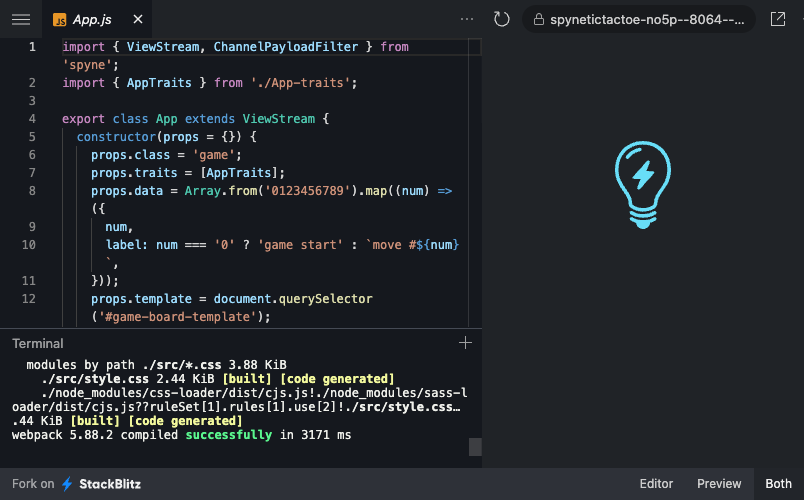
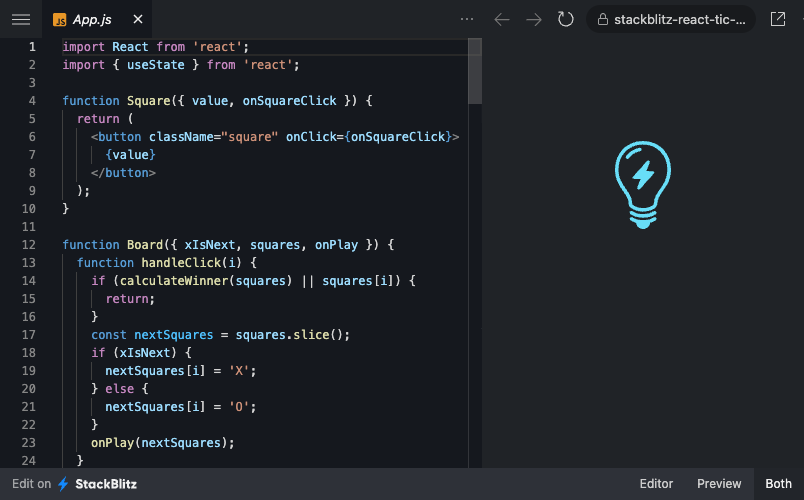
A familiar project: Tic-Tac-Toe
The classic React tutorial implemented in SpyneJS, with the original alongside for orientation. Because the project is already familiar, the code reads as a translation: each piece of the game maps to its home in view, behavior, or logic — and the structure shown here is the same one used at every scale.
A Familiar Project For Angular developers
What carries over
Declarative templates, component-based structure, and service-driven behavior all have direct equivalents in SpyneJS. Separation of concerns is preserved.
Where things live in SpyneJS
What a service provides through injection, a Channel provides through subscription by name. Reusable logic lives in SpyneTraits — pure functions composed into both views and channels. There are no decorators or NgModule configuration; classes declare what they use in their constructor props. The concept map below places each familiar piece.
Concept map
| Angular | SpyneJS |
|---|---|
| Component | ViewStream |
| Component template | Template + data (bound at construction) |
| @Input properties | Constructor props |
| Service (shared state) | Channel with replay |
| Service subscription | addActionListeners |
| Event bindings | broadcastEvents |
| Injected utility services | SpyneTraits |
| HttpClient | ChannelFetch |
| Angular Router | Route Channel (built in) |
| ngOnInit / ngOnDestroy | onRendered / automatic disposal |
Why consider SpyneJS
Reasons Angular developers adopt SpyneJS, stated as what changes in the day-to-day work:
- Your RxJS skills are the native idiom. Channels are persistent observable streams — the reactive patterns Angular developers already know are not a technique here; they are how the framework works.
- No change-detection pass. A view updates when a payload it declared arrives — nothing scans for changes, and update timing is readable from the declarations.
- Shared state without injection. A Channel is subscribable by name from any view or channel, with replay for late subscribers — no providers, no injection tree, no service wiring to trace.
- You work in the real DOM. What renders is what the code declares, and the tree in browser devtools is the same tree your code addresses.
- Applications are self-contained. A SpyneJS application is a single-page application with no server runtime: host it wherever static files serve, or use query-parameter URLs to embed it inside enterprise hosts like AEM.
- AI tools read the current idioms. The SpyneJS Generative Grammar (
@spynejs/grammar) ships a versioned description of the framework, so coding agents write against the practices of the installed version. - The starting point is enterprise tested.
spyne-cli create-appscaffolds the Application Shell — a complete application with channels, routing, and structure in place — and the Behavior Console shows every event and payload in real time as you build.
A familiar project: Tour of Heroes
Angular's canonical SPA tutorial implemented in SpyneJS, with the original alongside for orientation. Routing, UI updates, event handling, and modular composition — each expressed through the View–Behavior–Logic pattern, in a project whose shape is already familiar.